Setting up an Affiliate Program for a Campaign
Written By Carlos
Last updated About 1 year ago
Vendors can enable and set up an affiliate program for a campaign and the products and sales funnels related to the campaign.
To enable and set up an affiliate program for a campaign, please follow the instructions below:
Step 1:
Step 1:
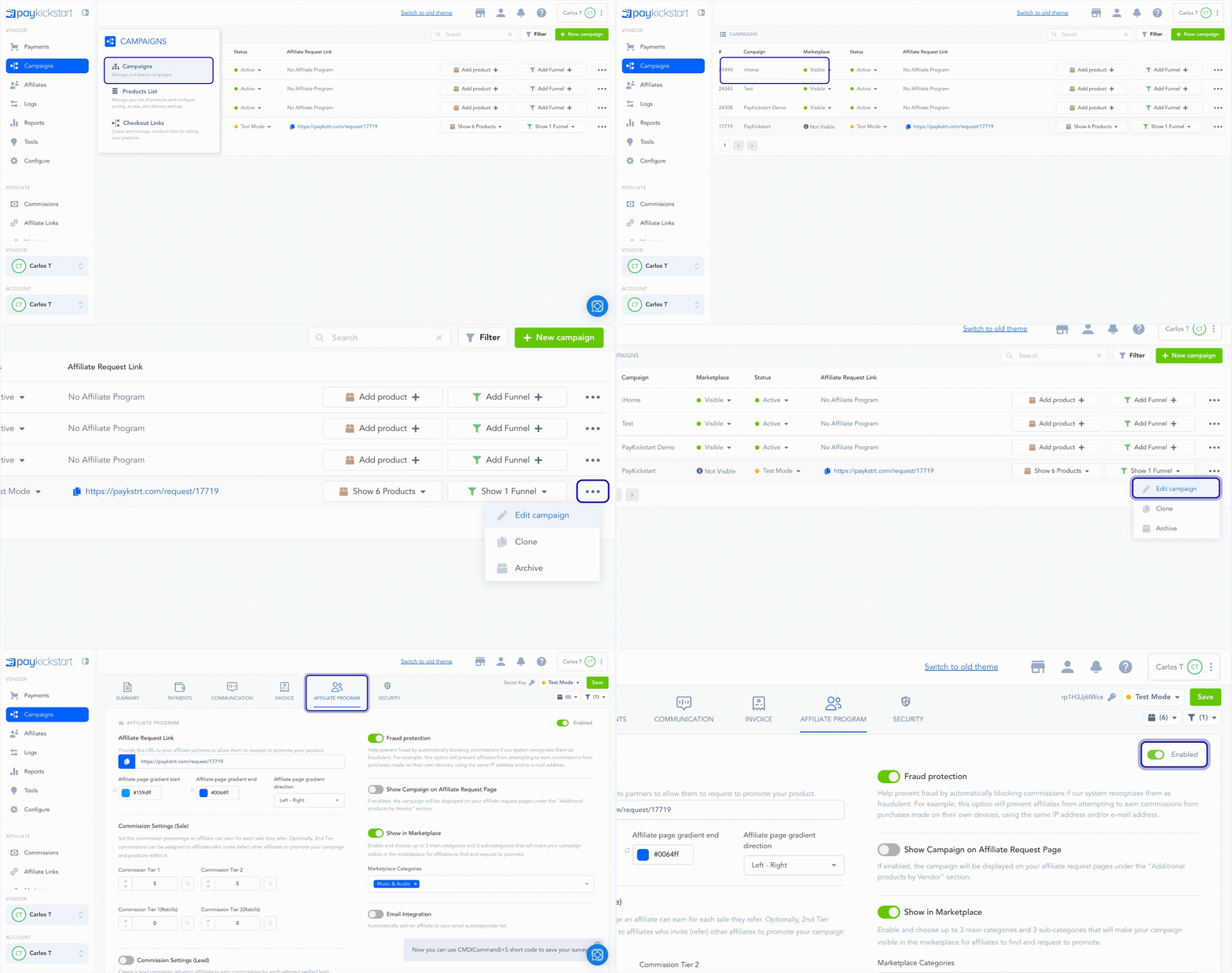
Locate the campaign you want to enable the affiliate program for and access the Campaign’s Settings.
Proceed to Campaigns and select the Edit button for a Campaign for which you would like to have an Affiliate Program.
Go to the Affiliate Program section and click Enable.
Step 2:
Step 2:
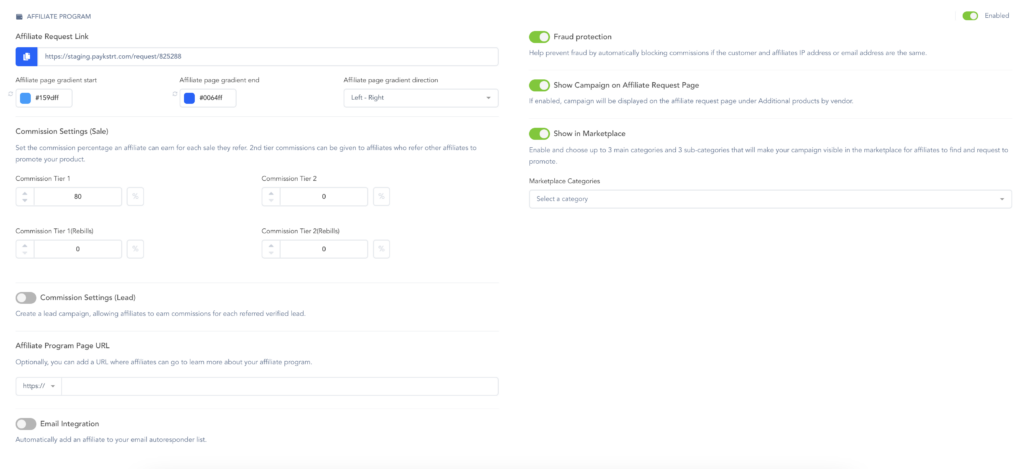
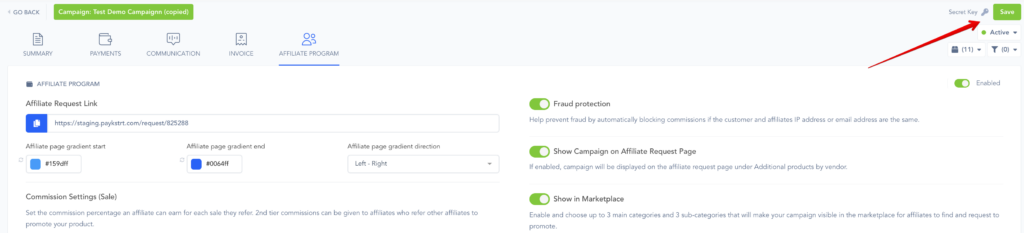
Enter the following settings to set up the affiliate program for the campaign.
Show Campaign on Affiliate request Page:
This option will allow this campaign to show on the affiliate request page for other campaigns, so if you have multiple campaigns the affiliate can signup for, they can see them as well.Fraud Protection(IP Match):
This option allows vendors to block commissions for an affiliate if the customer purchase and the affiliate share the same IP address.purchasesAffiliate Request Page URL:
This is the URL used to invite affiliates to promote the campaign. This link will also be visible from the main campaign section.Affiliate Program Page URL(Optional):
If you have a web page you have created for your affiliate program that has details about your program, you can add the URL here so affiliates can access the page from various locations in their account such as the affiliate links and marketing sections.Affiliate request pages.
Affiliate links section.
Affiliate marketing section.
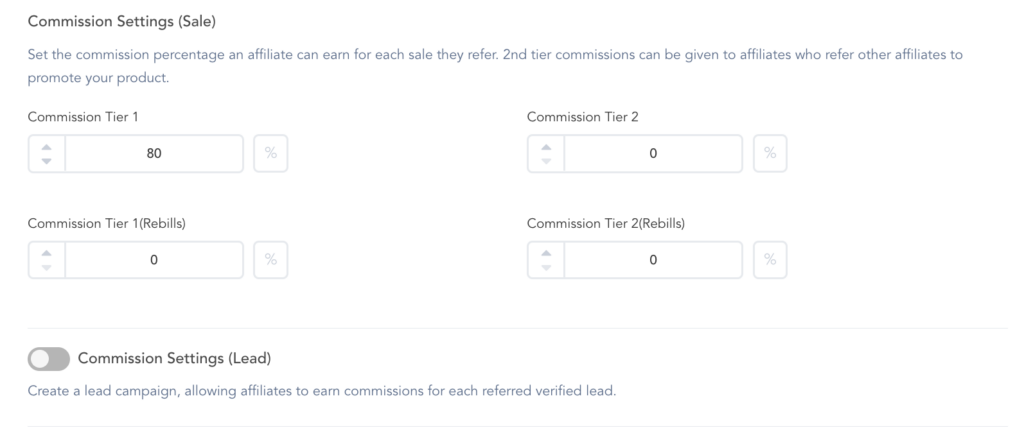
Commission Settings:
These fields are used to set the commission percentage an affiliate will make of a product sold from the related campaign. This is the general campaign commission percentages, but these can also be overridden at the product level if needed.Tier 1: Commission for an affiliate who shared their link with a customer to purchase. You can set a commission for the first charge and rebill charges if you have them.
Tier 2: Commission for the affiliate that shared their 2nd tier signup link with a new affiliate, then the affiliate made a sale using their first-tier link. 2nd tier affiliates can earn commissions from sales made by their referred affiliate if you add a commission for 2nd tier.
Optional: If you need to set the commission percentage for a specific product, please do so via the specific product settings
To learn more about 1st and 2nd tier commissions, please see: https://support.paykickstart.com/knowledge-base/1st-tier-vs-2nd-tier-commissions/
Vendors have the ability to set a commission percentage for 1st and 2nd tier affiliates for the 1st initial sales and rebills. Optionally, if the product is related to a subscription product with a trial, vendors can also set the commission percentage for the first paid billing transaction after the trial via the specific product settings if needed.
IMPORTANT NOTE: Payment gateway fees are NOT deducted or factored into the calculation for commissions in any way.
EX: If the product is $100 and the commission percent is 50%, the affiliate would receive $50.
Affiliate Page URL(Optional): If you would like affiliates’ 2nd-tier affiliate signup link to direct to a custom page, you can add the URL here.
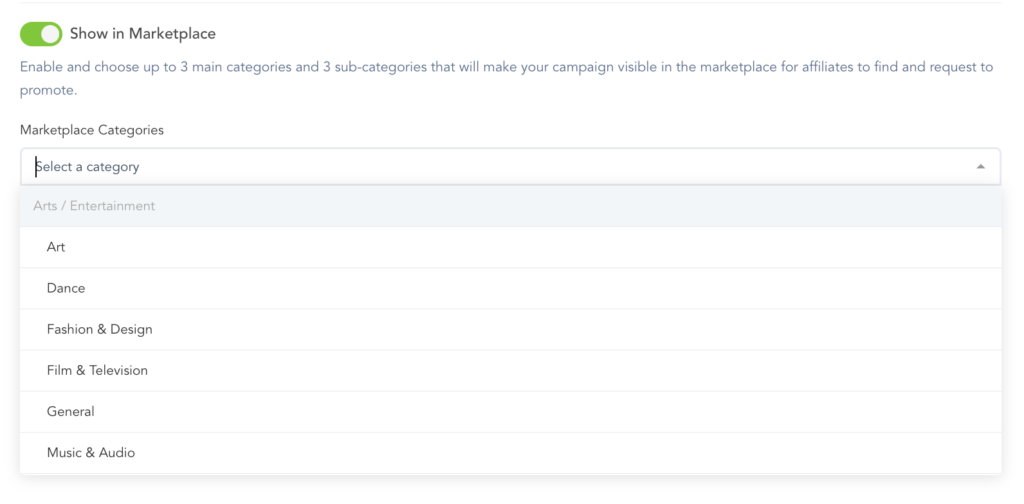
Show in the Marketplace: This option allows you to show the campaign in the affiliate marketplace if you would like. This setting is optional; if you do not want to list your campaign in the affiliate marketplace, leave this option disabled.
After setting up the campaign options, save the campaign by clicking the top right of the page.
Step 3:
Step 3:
After saving the campaign settings for your affiliate program, you want to make sure you have your products created and related sales funnels created.
Affiliates will automatically be provided affiliate links to the sales funnel related to the campaign, so you want to check your sales funnel settings to ensure at least 1 sales funnel is approved for affiliates to use.
To learn more about setting up a sales funnel, please see:
https://paykickstart.featurebase.app/en/help/articles/0090613-setting-up-a-sales-funnel
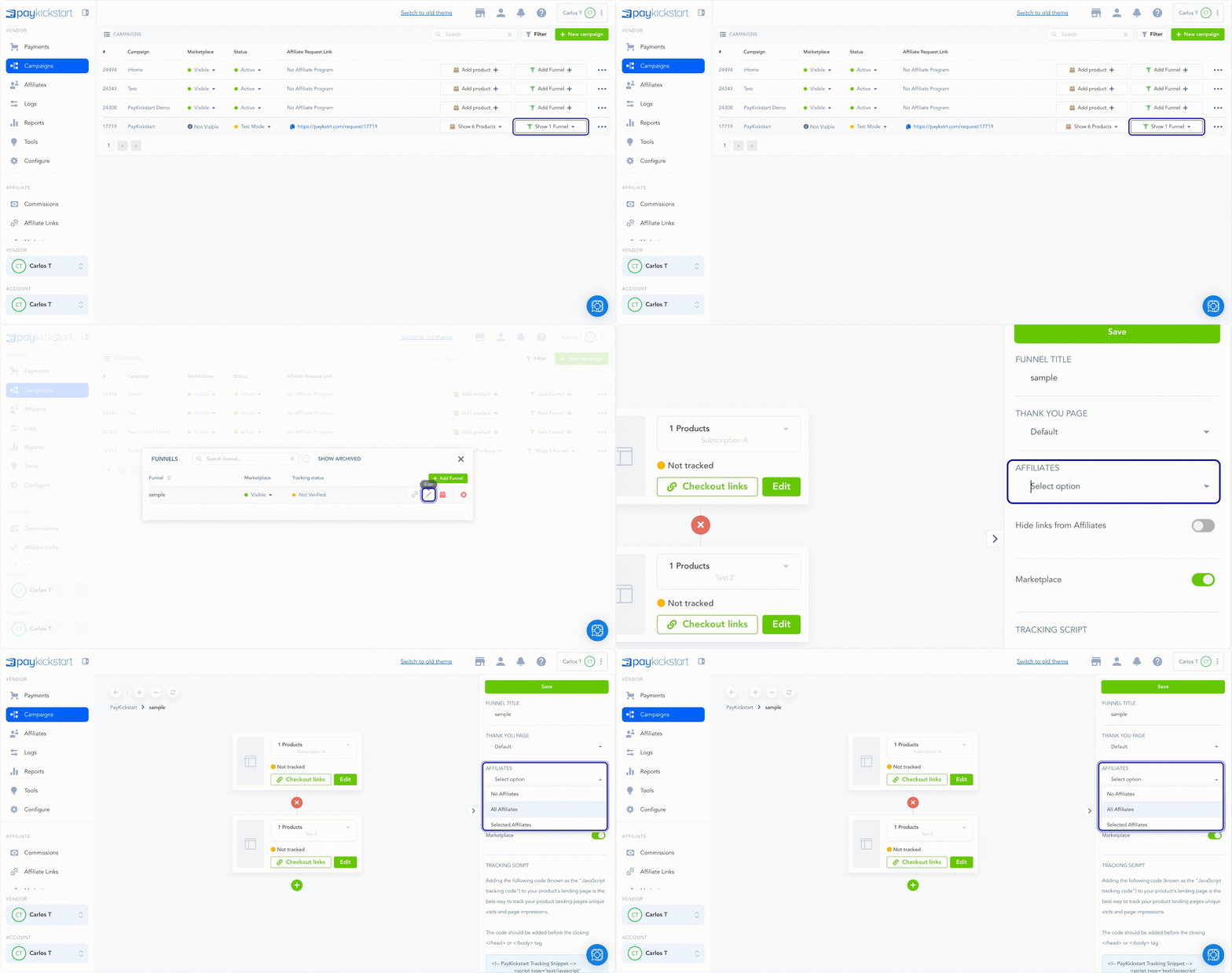
After setting a sales funnel for all or selected affiliates, the affiliates of the related campaign would have access to a related affiliate link to share with customers for the sales funnel.
If a customer purchases using the affilaite’s link, then that affiliate will be credited for the sale.
Step 4: (optional)
Step 4: (optional)
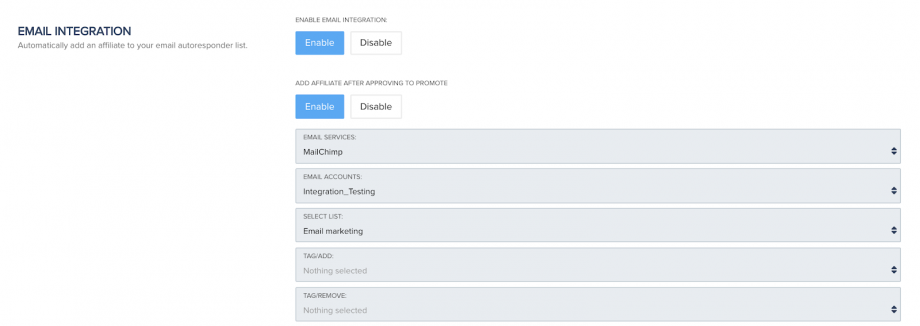
Vendors also have the option to add affiliates to an integrated email autoresponder mailing list upon approving the affiliate for the related campaign.
If you would like to enable this setting, go to the related campaign settings and enable the email integration in the affiliate settings for the related campaign.
Ensure that you have already integrated with an Autoresponder platform
Then select the platform service, email account, and the related mailing list you want to add affiliates to.
Optionally, you can add or remove tags if your autoresponder supports this ability.
Step 5:
Step 5:
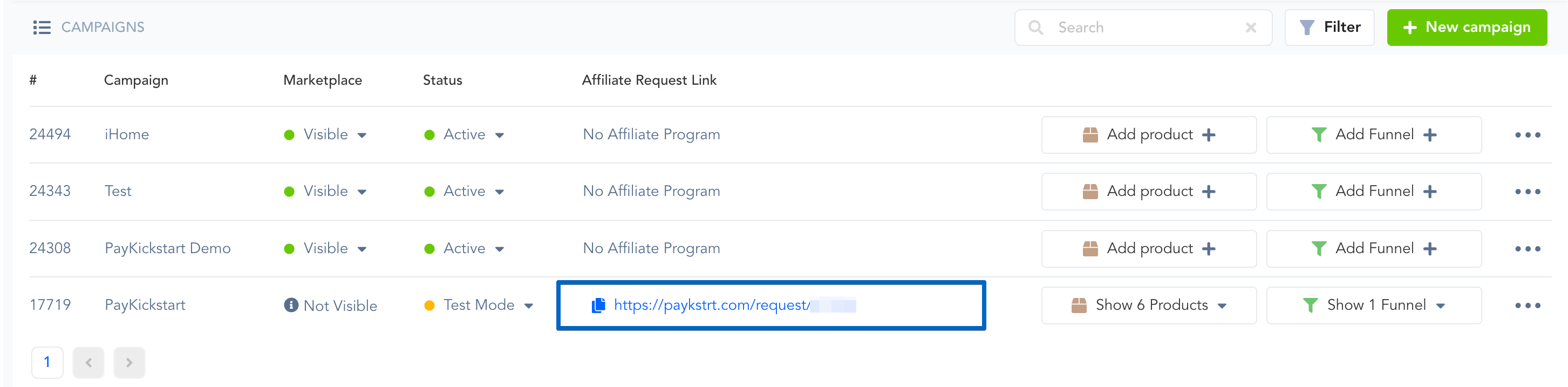
After you have enabled the affiliate program for a campaign and are ready to invite affiliates, you can go back to the main campaign section and copy the campaign affiliate request URL to share it new affiliate to request to promote your campaign.
Each campaign will have a specific request URL to request to promote that campaign.
Learn more about handling affiliate requests here: https://support.paykickstart.com/knowledge-base/handling-affiliate-requests/
To learn more about how to manage your affiliates, click here:
https://paykickstart.featurebase.app/en/help/articles/3447848-managing-affiliates
To learn more about paying out affiliate commission, click here:
https://support.paykickstart.com/en/help/articles/9851273-how-to-handle-affiliate-commission-payouts
If your affiliates cannot see their links, please click here:
https://paykickstart.featurebase.app/en/help/articles/8395407-why-cant-affiliates-see-their-links
To learn more about checking affiliate links to ensure the affiliate will be credited for the sale, please click here:
https://paykickstart.featurebase.app/en/help/articles/2655492-affiliate-link-checker-tool
If you need to create additional tracking links for your affiliates, please click here:
Was this helpful?
Still need help? Ask the team