Handling Affiliate Requests
Written By Carlos
Last updated About 1 year ago
Each campaign will have a specific request URL to request to promote that campaign, and it will be located in your Campaigns section, or for affiliates, within the Marketplace if your Campaign is set to be visible within it.
Once the affiliate uses the link to request to promote your campaign, you will see the request in your vendor account as a notification in your top platform bar.
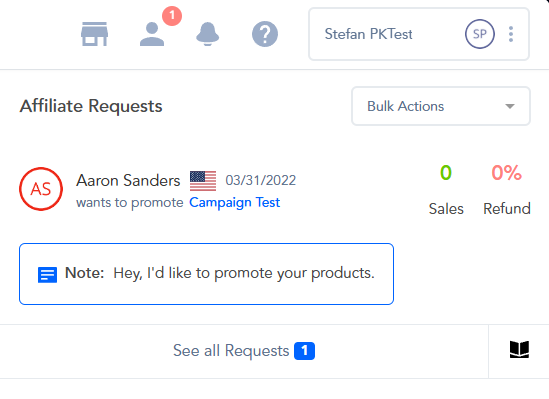
You can also review your Affiliate requests by going to the Affiliate → Requests section.
There are a few different ways to approve or deny affiliate requests.
To understand the difference between Instant and Delayed affiliate payouts, please refer to this article.
When approving affiliates, you will be given the ability to approve/deny the affiliate for the individual product/funnel that they’re requesting, or also approve/deny for ALL of your products/campaigns.
Deny: denies the affiliate’s campaign promotion request.
Approve (Delayed): Approves the affiliate for the specific campaign and set’s their commission to be reviewed and manually paid out by you.
Approve (Instant): Approves the affiliate and sets their commission to be instant IF the affiliate is using PayPal and has enabled instant commissions AND the customer purchases via PayPal. All other commissions will be manual by default.
Approve All (Delayed): Approves the affiliate for All current Campaigns and sets their commission to be reviewed and manually paid out by you.
Approve All (Instant): Approves the affiliate for All current Campaigns and sets their commission to be instant IF the affiliate is using PayPal and has enabled instant commissions AND the customer purchases via PayPal. All other commissions will be manual by default.
Learn more about Instant and Delayed(manual) commissions at: https://paykickstart.featurebase.app/en/help/articles/6329130-what-is-the-difference-between-instant-vs-delayed-payments
Option 1: Affiliate Requests section
Option 1: Affiliate Requests section
Go to Affiliate > Requests.
In this section, you will see all of your affiliates and can go to the request section to view and approve new affiliates.
You can also search by the Affiliate Name, Email, or Affiliate ID.


Option 2: Dashboard
Option 2: Dashboard
You can also see all new requests here in the top notifications area of your PayKickstart dashboard.
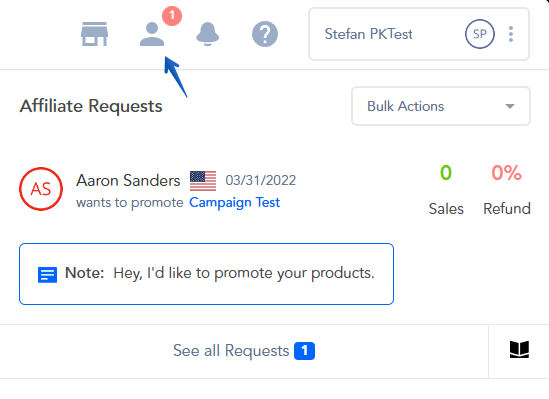
Simply click on the Approval option your wish to approve the affiliate for once the request arrives.
Option 3: Mobile App
Option 3: Mobile App
Access all Affiliate Requests from your Mobile Device.
You will need to download the PayKickstart iPhone or Android Mobile App.
From within the app, locate the menu icon in the top right. Tap the icon.
Locate REQUESTS. All of your affiliates’ requests will be found here. With a slide and tap of your finger, you can quickly approve or deny affiliates, right from your mobile device!
From here, you are taken to an Affiliate Requests screen to view the options of each affiliate request, slide to the right. The options will appear. Then tap on your choice.
Please Note: Vendors can also automate Affiliate Approval, and these settings can be managed in your platform settings.
Set the Affiliate Approval to Auto-Approve, choose your Tracking Settings, and Payout type that would apply to all future affiliate requests.
More about managing your account-wide options via the Platform Settings section can be found at: https://support.paykickstart.com/en/help/articles/3571738-platform-settings
Vendors have the ability to set up different Tracking settings (such as Lifetime Commission terms): Click here to learn more.
Vendors can approve affiliates for different Payout Types, find out more about the difference between Instant and delayed payout types at: https://support.paykickstart.com/knowledge-base/what-is-the-difference-between-instant-vs-delayed-payments/
Was this helpful?
Still need help? Ask the team