Integrating Thinkific
Written By Angela L
Last updated 6 months ago

This tutorial will guide you through the process of integrating the Thinkific membership service into your campaign and products.
PLEASE NOTE:
The Thinkific public API is Thinkific Plans:

Step 1: Access the Configure → Integrations section
Step 1: Access the Configure → Integrations section
In your PayKickstart account, go to Configure → Integrations.
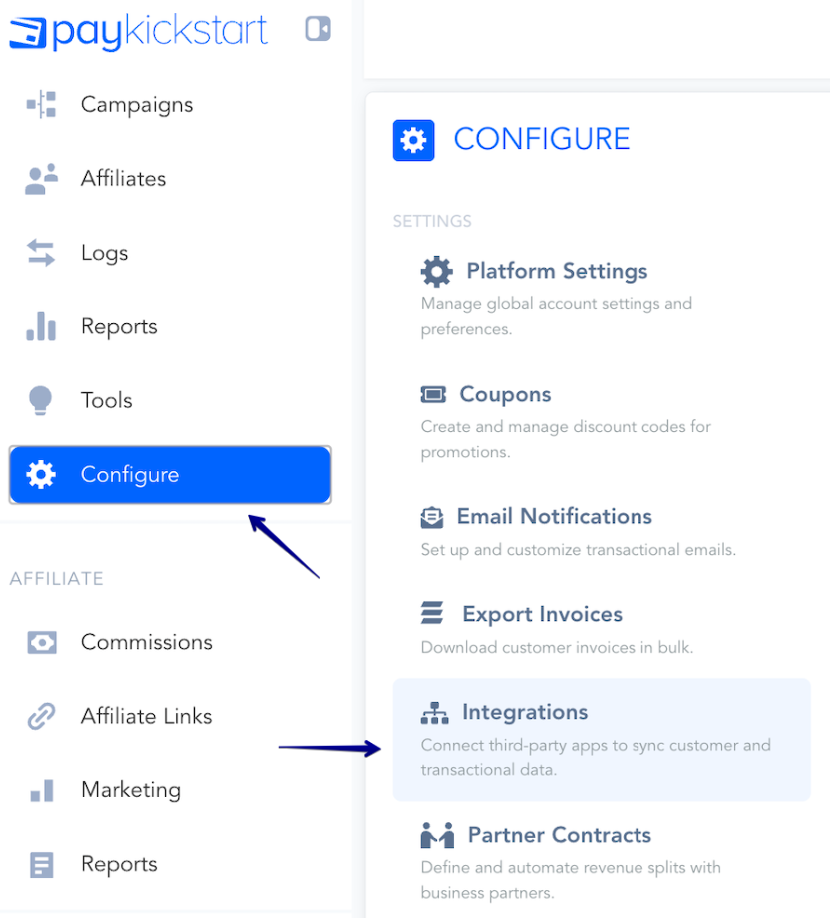
First, you’ll need to integrate on your main integration page.
Inside the Integrations menu, make sure to click on the Available tab.
Then, find the Membership category in the filter, and scroll down to locate Thinkific.
You can also search for Thinkific directly within the Search field:
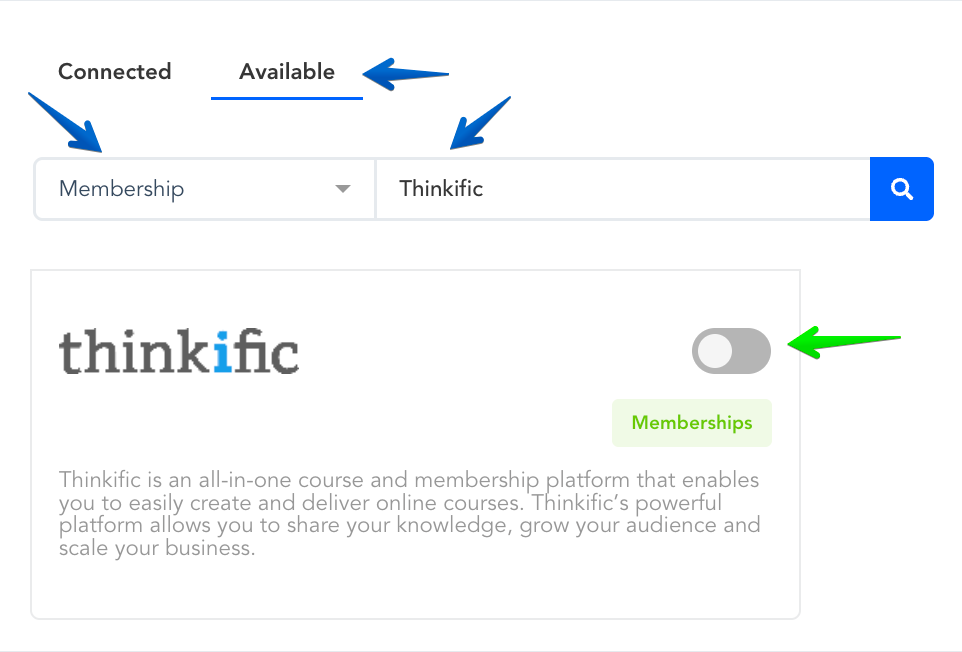
Enable Thinkific by clicking the toggle switch.
Step 2: Connect Thinkific integration
Step 2: Connect Thinkific integration
For Thinkific, you will need a URL, API Key, and the Login URL.
To find this info, do the following:

Grab your Thinkific API Key and Subdomain from your Thinkific account as seen below:
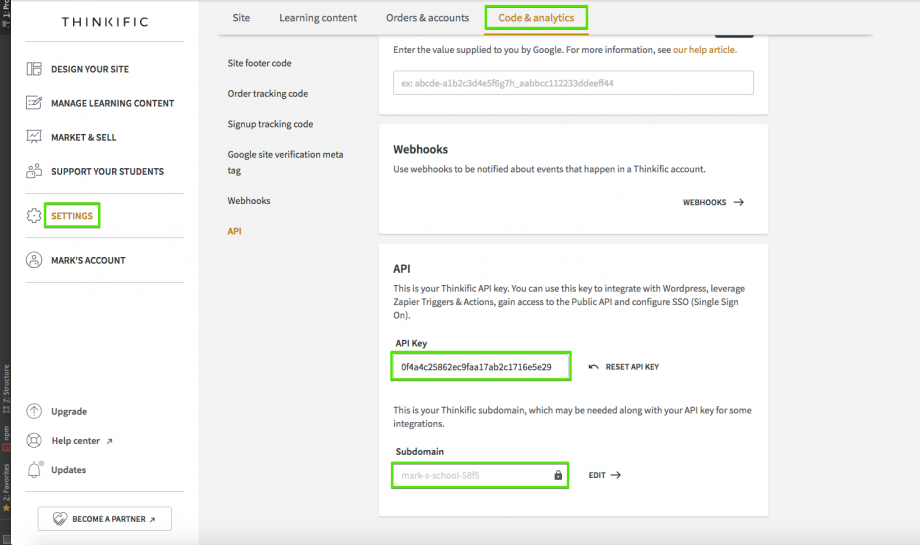
Login URL: The URL of the Membership Area Login page emailed to the customer along with their credentials.
Once this information has been entered, Select Connect
Step 3: Creating an Automation Trigger for your Product(s)
Step 3: Creating an Automation Trigger for your Product(s)
After connecting your account, you must set up a Trigger to tell PayKickstart when to send customer information to Thinkific.
In the PayKickstart dashboard, go to Configure and select Triggers →
https://app.paykickstart.com/vendor/configure/triggers
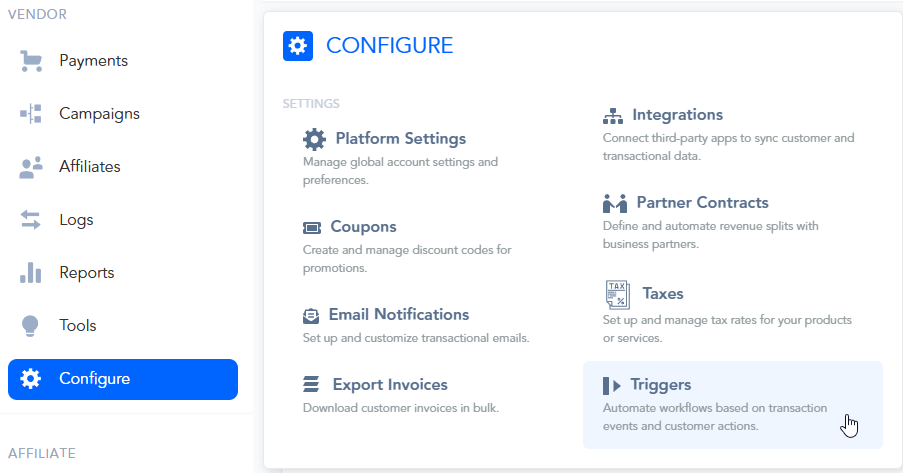
Click the + New Trigger button to create a new rule.

Configure the Trigger settings as follows:
Status:
First, toggle the switch at the top to make the trigger ACTIVE.Trigger Name:
Give your trigger a descriptive name so you can easily identify it later
(e.g., "Product 1 - New Sale to Thinkific").
Select Event(s):
Choose the event that will fire this trigger.
For adding new customers, New sale is the most common choice.
Please note:
Available event options will show clearly only after saving your first trigger.
We recommend choosing the New Sale event when setting up the integration for the first time as it would trigger with any new transaction that is created for the product.
For Thinkific, the currently available and supported events are:
New Sale - triggers when a new transaction is created for the product
New Trial - triggers when a new trial is started for the product
Refund - triggers when a refund is issued to the customer, for the specific product
Subscription Cancellation - triggers when a Subscription is cancelled, for the product
Pending Cancellation - triggers when choosing to cancel the subscription at the end of the billing period, instead of immediately
Cart Abandonment - triggers 15 minutes after the checkout page has been abandoned
Subscription Changed - triggers whenever the subscription’s plan has been changed to a different one
IF Condition (The Rule):
This defines the variable that must be included for the trigger to run.
Important: The IF condition must be set to a Product, for the integration to function.

Best Practice Use Case:
We recommend creating a separate trigger for each product.
This makes it easier to manage and troubleshoot specific product integrations if needed, rather than having 1 trigger where all products are selected.
THEN Action (The Result):
This defines what will happen when the IF condition is met.

Set the THEN action to: add customer to a membership.
Service: Select Thinkific from the dropdown.
Account: Choose the Thinkific account you connected in your Integrations section.
Select a Level: the membership level where customers will be added to.
Once you have configured the rule, click the Update Trigger button to save your automation.
Optional: Vendors using Thinkific’s bundle options are also able to integrate the product using Thinkific bundles if needed.
In your Thinkific account, locate the ID for the related bundle.
Screenshot: https://monosnap.com/file/XAXYYQYRKrs8BXOcQi1PigWRl05HiC
Use this ID in the integration settings for the related bundle.
Screenshot: https://monosnap.com/file/pLinP5EjGvmjGqT1ZE5fxrSy7NDQH4
Leave the level field blank, as you are using a bundle ID
After you save the integration settings for the product, the customer will receive login access to the membership platform after purchase.
If the purchase is related to a subscription, access to the membership would be controlled automatically by the customer’s subscription status in PayKickstart.
Was this helpful?
Still need help? Ask the team