How to Manage Upgrade/Downgrade of Product or Subscription Level
Written By Stefan S.
Last updated 5 months ago

PayKickstart offers a few different options when handling the ability to Upgrade or Downgrade a customer(s) from one Product/Subscription Level to another.
Option #1: Inside PK Dashboard
Option #1: Inside PK Dashboard
To manually upgrade or downgrade a customers Product/Subscription Level, go to Payments → Subscriptions.
Then, click on the Upgrade/Downgrade button within the specific subscription’s detailed view in the top right corner drop-down menu.
Now you can choose the product from the same campaign that you want to change the customer to.
IMPORTANT: The new Product must be from the same campaign as the customer’s current subscription.
HOW UPGRADES/DOWNGRADES WORK:
By default, the next billing date for the first charge after the up/downgrade will remain the same as the next billing date of the original subscription.
If upgrading to a higher value plan, the customer would be charged the new subscription price on the next charge date.
If downgrading to a lower value plan, the customer would be provided “Credit” on the new subscription to use on future payments until the credit is gone.
(See bottom of article for full explanation and example)
ADDITIONAL OPTIONAL SETTINGS:
Vendors also have the option to enable and use the advanced options to alter the subscription's next charge date, First charge amount, units allowed, or add a coupon if they need to alter these manually.
A pop-up modal will display the following options:
#1. Product: Select the new product/subscription they should now be associated with.
Note: You must FIRST have this product setup in PayKickstart in the same campaign as the original product purchased and it MUST be a recurring subscription product.
#2. First Charge: This is the amount that you want to charge today as part of the proration. This amount will be billed to the customer today.
If you want to prevent the customer from receiving a credit or probation charge on the up/downgrade, you can set the first charge as 0.
IMPORTANT: If the customer has any credit on the subscription, manually overriding the first charge field WILL remove the credit from the customer.
If you DO NOT want to remove any existing credits, DO NOT manually override the First Charge field.
#3. Units Allowed: This optional feature will ONLY show if you are using our usage-based feature. It will allow you to manually add units allowed for the first period of the new subscription.
#4. Next Charge Date: This field changes the next time the customer will be charged for the main subscription billing. You can specify a future date for the next charge in this section or leave it as is to charge on the next previously established billing date.
#5. Coupons: This field allows you to add a coupon that applies to Rebills during the Upgrade/Downgrade of the customer’s subscription. *Please note the coupon will not apply to the pro-rata charge (if there is one) – only subsequent rebills.
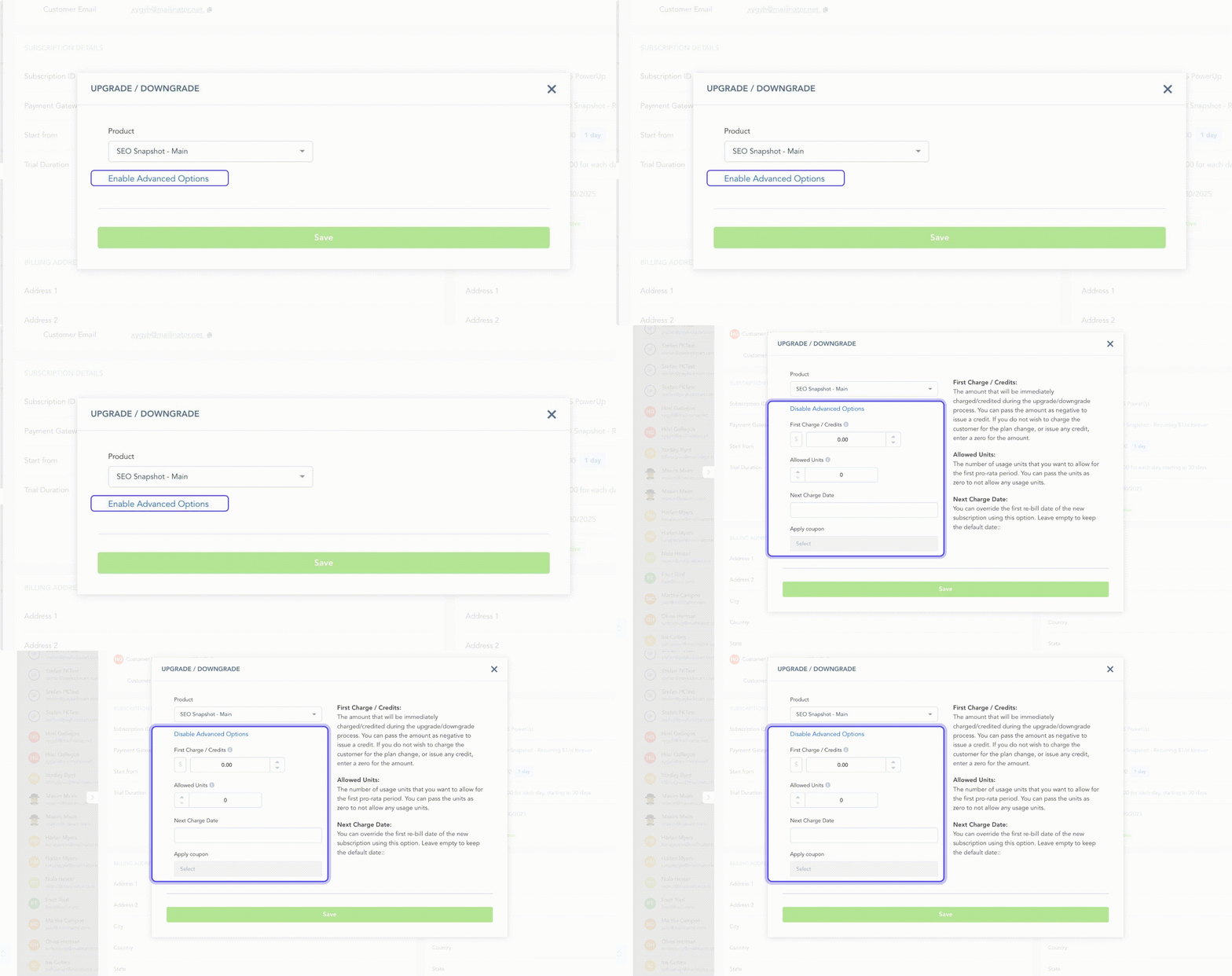
If you do not alter #2, #3, #4, or #5 by using the advanced settings, PayKickstart will handle the subscription change automatically, calculating the next charge amount and usage units(if applicable).
In case you are looking into carrying over the customer’s trial period to the new plan, please see this article:
→ How to carry over the trial period during an Upgrade/Downgrade
Option #2: Customer Billing Portal
Option #2: Customer Billing Portal
If you have enabled the ability in your products for “Available on billing portal”, then customers can also up/downgrade their subscriptions by themselves via the billing portal.
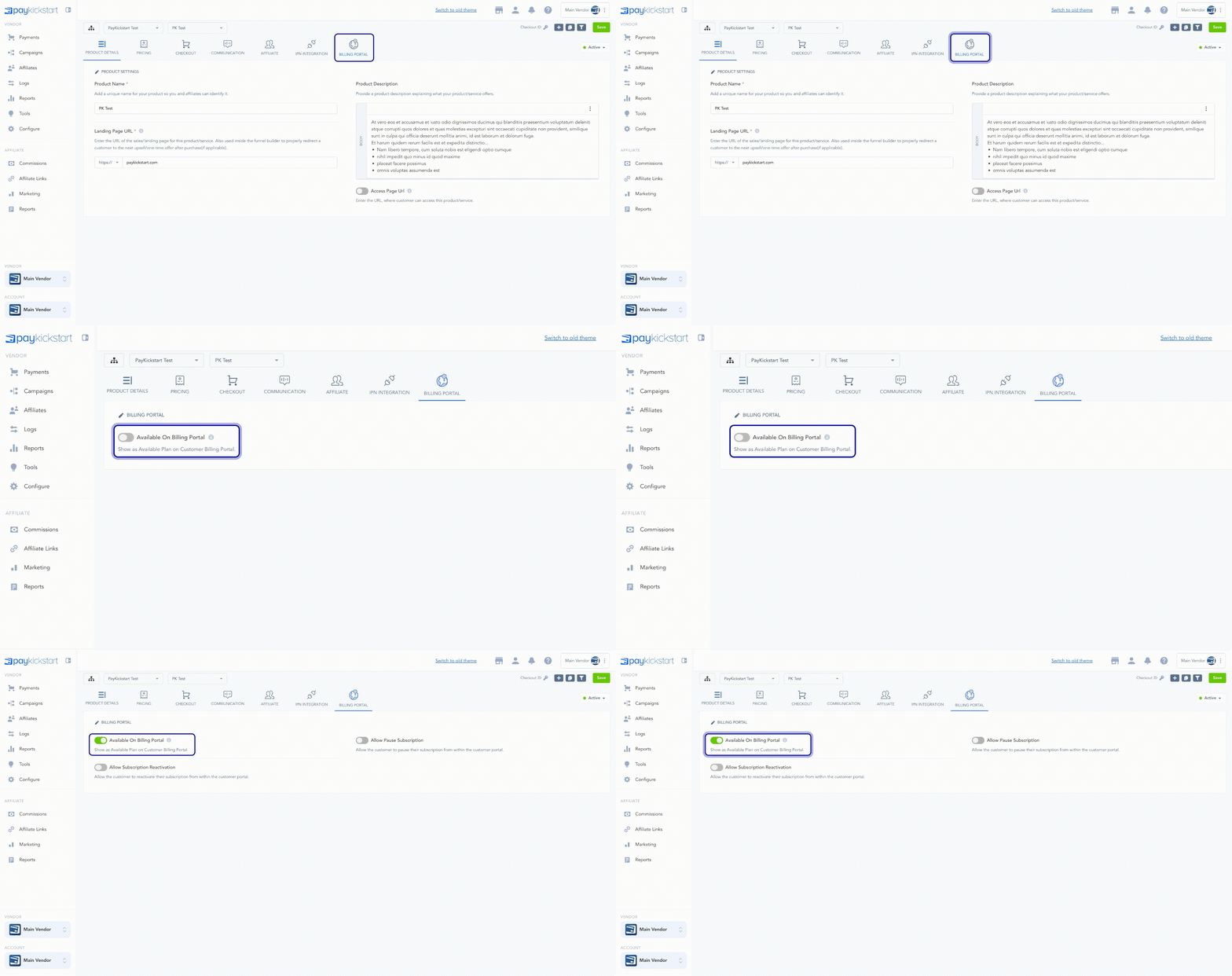
If the customer up/downgrades via the self-service billing portal, then PayKickstart will automatically handle and proration or credit to be applied to the customer’s subscription.
Option #3: PK API
Option #3: PK API
This option was designed for those who have the technical resources to create custom subscription management. Typically this option is for SaaS/Web Applications that have their own Billing area inside their app and want to offer various Level/Plans and allow the customer to manage their account inside the app.
Below are 3 outlines of how you can achieve up/downgrades using PayKickstart API:
3a: Standard API call to up/downgrade subscription.
*NOTE: If you want to prevent the customer from receiving a credit or probation charge on the up/downgrade, you can set the “first charge’ as “0”.
IMPORTANT: If the customer has any credit on the subscription, overriding the first charge field WILL remove the credit from the subscription.
THE API METHODS BELOW ARE FOR MORE CUSTOM OPTIONS IF NEEDED,
WE RECOMMEND USING OPTION 3a FOR UPGRADES/DOWNGRADES.
3b: If you do not have a Reference Purchase or prefer to the customer re-enter billing info:
Each level would be created as a separate product.
When your user logs into your app and clicks on one of the upgrade / downgrade buttons, this should trigger a separate purchase of the new “level” (product) in PayKickstart. You can either pass a unique customer identifier to our standard checkout URL like this: https://app.paykickstart.com/checkout/1234?customer=1234 (where customer is your customer’s id),
or if you also want to control the product price at a granular level for things like pro-rata usage billing, you can create your own Purchase request via our API (see documentation for that here: https://docs.paykickstart.com/#new-purchase-step-2-40new-purchase-request41-step-2-40new-purchase-request41 )
NOTE: to charge a pro-rated upgrade price, you can override the trial fields – set a trial amount and trial days. This will set the amount to charge in the first transactions and the number of days to wait before billing the subscription with the normal product pricing. If you want to prevent the customer from receiving a credit or probation charge on the up/downgrade, you can set the “first charge’ as “0”.After the customer has purchased the new “level”, our IPN will fire a POST request to the endpoint of your choosing – here’s a link to the documentation on that: https://docs.paykickstart.com/#collapse-1
You’ll note that it’ll pass back your customer’s identifier in the POST as custom_FIELDNAME, where FIELDNAME is the custom field name you passed to the checkout page.
Your IPN digest script (i.e., the script at the URL you defined in your product’s settings that receives the IPN notification) can then use the IPN it receives to match the customer’s identifier to your customer record in your application, and change their “level” to the desired level in your app.
You should also CANCEL the previous subscription in PayKickstart (if this is relevant) for whichever level your customer was on before – you can do that using this API:
https://docs.paykickstart.com/#subscription-cancel-subscription-cancel-subscription
3c: If you prefer the customer NOT re-enter billing info:
If using the Old PayPal(Adaptive/Depreciated) (Not Braintree PayPal) integration, upgrade/downgrade is not possible via API. Customer will have to cancel existing subscription and buy new subscription.
1. Each level would be created as a separate product.
2. Fetch the customer’s purchase record using our Get Purchase API:
https://docs.paykickstart.com/#payments-get-purchase-get-purchase
3. Use our New Purchase API (https://docs.paykickstart.com/#new-purchase-step-2-40new-purchase-request41-step-2-40new-purchase-request41) and pass the invoice ID from #2 as “ref_purchase” parameter. You can use all other parameters according to your needs. This way our system will charge the customer’s existing billing method.
NOTE: to charge a pro-rated upgrade price, you can override the trial fields – set a trial amount and trial days. This will set the amount to charge in the first transactions and the number of days to wait before billing the subscription with the normal product pricing.
If you want to prevent the customer from receiving a credit or probation charge on the up/downgrade, you can set the “first charge’ as “0”.
4. If you receive a successful response from #3 then cancel the old subscription using our Cancel Subscription API (https://docs.paykickstart.com/#subscription-cancel-subscription-cancel-subscription)
Additional Notes:
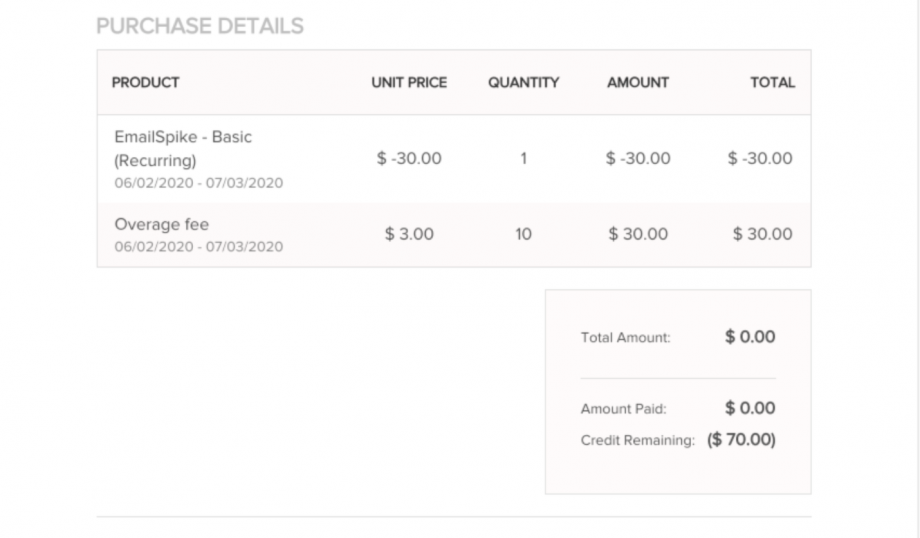
Credit Remaining (At the time of the transaction) will show on the customer’s invoice if applicable.
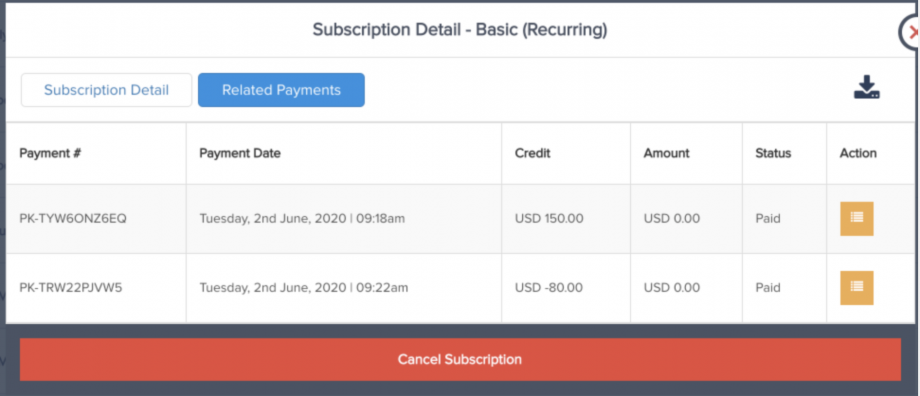
Related Subscription transactions will also show credits applied and used if applicable.
Subscription Upgrade Logic Calculation
Full explanation of how the up/downgrade logic works.
Basic Tenets:
1. We do not change the next charge date for the pro-rata period, as this has proven to be a huge problem if usage-based billing is in use.
NOTE:
If there’s no pro-rata period remaining, the new subscription is charged and the next date is calculated based on the new subscription’s rules. Trial periods are never considered in pro-rata calculations (i.e. in case of trial pro-rata = 0)
2. We issue a CREDIT or a CHARGE during the upgrade process depending on the remaining value of the current subscription vs the new subscription.
Process example:
1. The value of each subscription is calculated as the monetary value of that subscription per day (VPD). For example:
1.1 Old Subscription: $60 every 30 days: VPD = $2.00
1.2. New subscription: $180 for 365 days: VPD = $0.49
2. Since trial periods are ignored during a subscription change, we must calculate the number of days remaining based on the current subscription frequency and the number of “days used” since the last charge. Let’s assume, for example, that 5 days after the last charge the customer upgrades, so days remaining = 25 days
3. We then calculate the value of those days remaining for the old subscription and the new subscription:
3.1 Old Subscription value until next charge date: $2 25 = 50
3.2 New Subscription value until next charge date: $0.49 25 = 12.25
In this scenario, the customer has already paid $60 from the old subscription (remaining value of $50), and only needs to pay $12.25 to pay for the new subscription’s pro-rata period of 25 days.
4. Therefore, $0 is charged, and a credit of $37.75 ($50 – 12.25) is passed to the new subscription, to be deducted from subsequent rebills until the credit is fully consumed. The first “365-day” rebill of $180 will occur in 25 days (again, we do not change the next charge date due to significant issues with doing this when dealing with usage-based billing).
5. It’s clear that if the VPD of the new subscription is higher than the VPD of the old subscription, then a CHARGE for the pro-rata period will be issued immediately, instead of a credit. Also note that any existing credits on the old subscription will be used in this pro-rata charge, should it occur.
Was this helpful?
Still need help? Ask the team