Auto-Apply a Coupon Discount by Adding the Code Directly to the Checkout
Written By Angela L
Last updated About 1 year ago
Vendors can add a coupon code to auto-apply it to the product offer without requiring your customers to manually enter and apply the code.
It’s simple to set up. You can follow the instructions below for each checkout type.
→ Checkout Pages
All you need to do is add the following to the END of your checkout URL.
?cc=COUPONCODE
Replace COUPONCODE with the actual coupon code for your product.
For example: https://app.paykickstart.com/checkout/798?cc=1offsk
→ Embed Forms
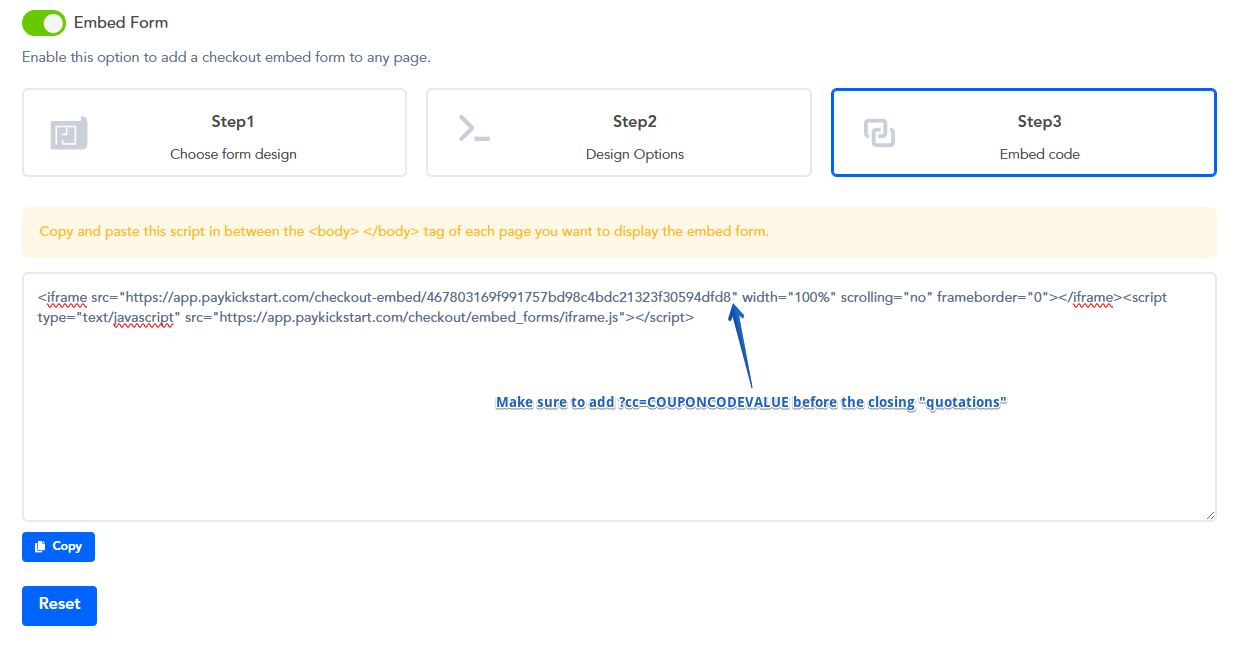
Add the following code line to the embed form code after the checkout URL and then paste the new embed form code on your web page.
?cc=COUPONCODE
Replace COUPONCODE with the actual coupon code for your product.
Ensure you include “ after the coupon code, or the embed code will NOT work correctly.
Then paste the new embed code on your web page.
Example:
<iframe src=”https://app.paykickstart.com/checkout-embed/cf9test0da3f6c7e4722e913b72?cc=COUPONCODE” width=”100%” scrolling=”no” frameborder=”0″></iframe><script type=”text/javascript” src=”https://app.paykickstart.com/checkout/embed_forms/iframe.js”></script>
→ Pop-Up Widget
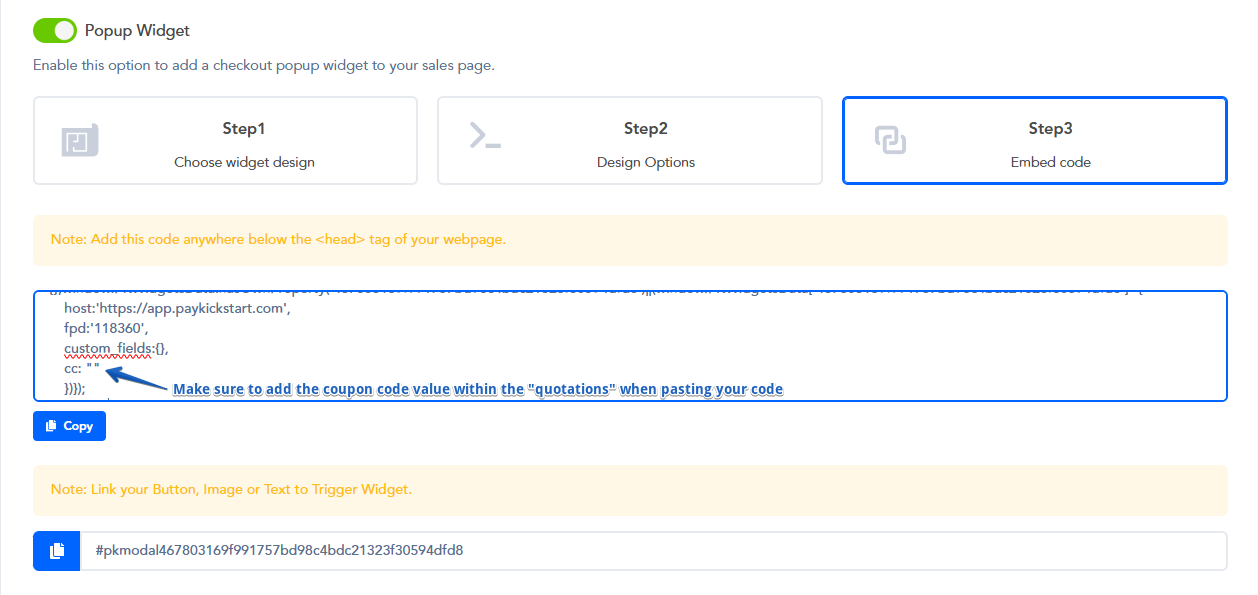
Insert the coupon code at the bottom of the widget embed code.
cc: “CouponCode”
Replace “COUPONCODE” with the actual coupon code for your product.
Then paste the new embed code on your web page.
Example:
<script type=”application/javascript”>
!function(a,b){var c=”PKWidgetScript”,d=document.getElementsByTagName(“head”)[0],e=document.createElement(“script”);e.type=”text/javascript”,e.src=a,e.id=c,document.getElementById(c)||d.appendChild(e),b()}
(‘https://app.paykickstart.com/widgets/checkout/main.js’,function(){window.PKWidgetsData=window.PKWidgetsData||{},window.PKWidgetsData.hasOwnProperty(‘cf94db48fb7aatest3f6c7e4722e913b72’)||(window.PKWidgetsData[‘cf94db48fb7aa4teste4722e913b72’]={
host:’https://app.paykickstart.com’,
fpd:’550′,
custom_fields:{},
cc: “CouponCode“
})});
</script>
PLEASE NOTE:
Auto-applied coupon codes to Upsell offers will not discount products being used as 1-click upsell products in a funnel.
If you are looking into discounting upsell products purchased with 1-click, we recommend overriding the price of the product(s) within the specific funnel by using the Funnel Override feature:
https://support.paykickstart.com/articles/7525960-funnel-override-settings
Was this helpful?
Still need help? Ask the team