How to reconnect ProfitWell to sync all data
Written By Stefan S.
Last updated Over 1 year ago
Sometimes vendors need to re-sync their Profitwell integration and data for various reasons.
If you have been advised by our support team or just need to re-sync your Profitwell integration, please follow the instructions below.
Step 1: In your PayKickstart account and go to the Configure → Integrations section.
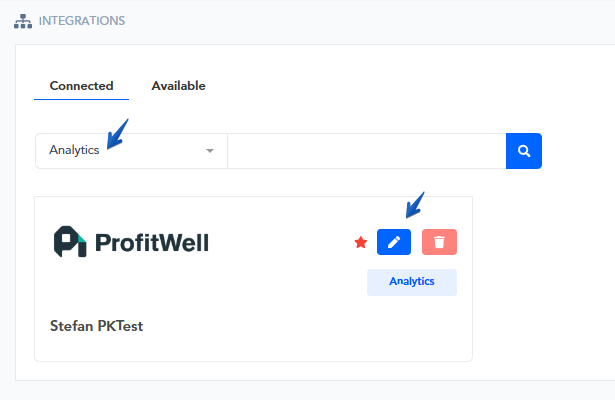
Step 2: Filter for the Analytics section in your Connected integrations.
Then, choose the option to edit your ProfitWell integration:
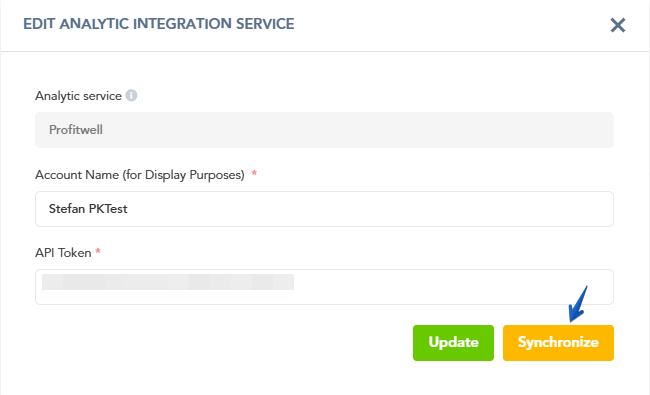
Step 3: inside the ProfitWell integration settings, click on Synchronize to begin the re-sync process.
That’s it!
Your PayKickstart and ProfitWell accounts will now begin re-syncing and update the Analytic data in ProfitWell.
PLEASE NOTE:
The data sync with ProfitWell is a 2 part process. PayKickstart will send all data to ProfitWell, then ProfitWell will process all the data. If you have large amounts of data, the full sync may take 24-48 hours or longer.
Was this helpful?
Still need help? Ask the team